


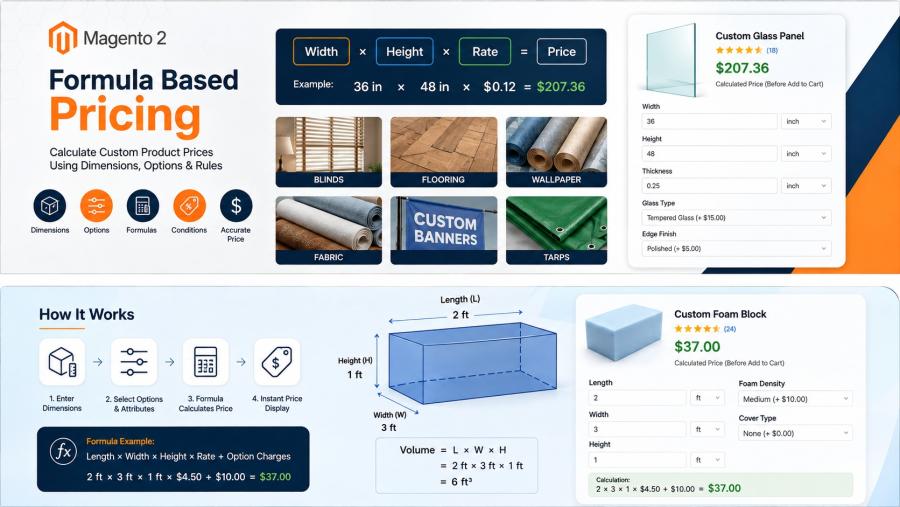
Not every ecommerce product has a fixed price. If you sell blinds, flooring, wallpaper, fabric, banners, tarps, foam, or other made-to-measure products, the final price may depend on dimensions, product options, attributes, or other variables.
That creates a practical Magento 2 pricing problem. A standard fixed product price is not enough when a customer can enter a width of 36 inches, a height of 72 inches, and then choose a different material or finish.
Magento 2 formula pricing provides a way to calculate product prices from defined mathematical rules instead of maintaining a separate price for every possible combination.
For example, a product might use width × height × price, while another could use length × width × height × price. More advanced pricing can also use product options, product attributes, static values, conditions, and mathematical functions.
What Is Formula-Based Pricing in Magento 2?
Formula-based pricing calculates a product's price using a mathematical formula and values associated with the product or entered by the customer.
Instead of creating hundreds of individual prices for different measurements, the merchant defines the pricing logic once. The store then uses the relevant inputs to calculate the price.
Common examples include:
- Width × Height × Price
- Length × Width × Height × Price
- Area × Price per Unit
- Volume × Price per Unit
- Dimension-based price plus an option charge
This model is especially useful for products where the price follows a predictable mathematical relationship.
When Do You Need Formula Pricing?
Formula pricing is worth considering when the price is calculated rather than simply looked up from a fixed list.
- The customer enters width, height, or length.
- The price changes according to the measured area.
- The price depends on volume.
- A selected product option changes the price.
- A product attribute affects the calculation.
- Different conditions require different pricing rules.
- Maintaining every possible size as a separate product price would be impractical.
There is an important distinction, however. A product can be size-based without being formula-based.
If a manufacturer provides a fixed table of prices for specific dimensions, a CSV or matrix pricing approach may be more appropriate than a mathematical formula.
Common Magento 2 Formula Pricing Examples
Width × Height × Price
This is a common model for products sold according to surface area.
For example:
Price = Width × Height × Price per Unit
A customer enters the required width and height. The store uses those values to calculate the price.
This type of model can work for products such as blinds, banners, wallpaper, fabric, and other made-to-measure items when the merchant's actual pricing rules follow this calculation.
Length × Width × Height
Products sold by volume can use three dimensions.
For example:
Price = Length × Width × Height × Price per Unit
This type of calculation can apply to products sold according to volume, such as foam or other materials where cubic measurement determines the price.
Area-Based Pricing
Flooring, wallpaper, banners, artwork, and similar products may be priced according to area.
A basic calculation is:
Area = Width × Height
The calculated area can then be multiplied by the applicable unit price.
The important point is that the formula should reflect the actual pricing policy. If the business uses a non-linear price table, formula pricing may not be the right choice.
Volume-Based Pricing
Volume-based pricing uses multiple dimensions to calculate cubic volume.
A basic formula is:
Volume = Length × Width × Height
The resulting volume can then be used as part of the product price calculation.
Option-Based Pricing
Dimensions are often only one part of the pricing model.
Consider a made-to-measure product where the customer enters dimensions and then chooses an additional material or finish. The final price may need to combine the dimensional calculation with the selected option.
This is where formula-based pricing becomes more useful than a simple dimension calculation.
How Magento 2 Handles Custom Formula Pricing
Magento 2 supports a wide range of standard product pricing features, but complex mathematical pricing models often require an extension or custom development.
MageArray's Magento 2 Formula Based Custom Pricing extension is designed for products whose prices depend on mathematical formulas.
The current product documentation confirms support for multiple rules and formulas within a single product. It also supports product options and product attributes in conditions and price formulas. Mathematical functions such as round(), floor(), and ceil() are supported as well.
The extension also allows static variables to be defined for use in equations. This can be useful when a calculation contains a fixed value such as a constant or predefined rate.
The current product documentation states that the extension supports simple products only, so merchants should verify their product structure before selecting this approach.
Formula Pricing vs CSV Pricing: Which Is Better for Your Magento 2 Store?
This is one of the most important decisions when designing custom product pricing.
The right choice depends on how the business actually determines the price.
Formula Pricing
Formula pricing is a good fit when the price follows a mathematical relationship.
- Width directly affects the price.
- Height directly affects the price.
- Length affects the calculation.
- Area or volume determines the price.
- Product options affect the formula.
- Product attributes affect the formula.
- Conditions change the pricing logic.
For example, if a product is consistently priced at $X per square foot, a formula can calculate the area and apply the appropriate rate.
CSV Matrix Pricing
CSV pricing is better when the merchant already has predefined prices for specific size combinations.
MageArray's Magento 2 CSV Table Matrix Pricing extension is designed for products where prices vary according to predefined sizes.
The extension supports measurement units including mm, cm, inches, feet, and meters. Customers enter their measurements and the system finds the applicable price from the configured CSV data.
It is particularly suited to products such as blinds, floor carpets, artwork, wallpaper, sheeting, tarps, and windows.
A Simple Decision Rule
Ask one question:
Can the price be reliably calculated using a mathematical formula?
If yes, formula pricing may be the better fit.
If the price must be selected from a predefined size-price table, CSV matrix pricing may be more appropriate.
Trying to force a large pricing table into a mathematical formula can make the system harder to maintain. Likewise, creating a huge CSV matrix for a simple mathematical calculation can create unnecessary administration.
Real-World Formula Pricing Examples
Blinds
Blinds are a strong example of custom measurement pricing.
A merchant may receive width and height from the customer and then calculate the product price based on those dimensions.
However, some blind businesses use predefined price tables instead. In that situation, CSV matrix pricing can be a better representation of the actual business rules.
MageArray's Blinds & Curtains Solution for Magento 2 uses CSV-based measurement pricing for width and drop and includes additional product customization capabilities.
Flooring
Flooring is commonly associated with area-based pricing.
A merchant may need to calculate the required area from customer measurements and then apply a price per square foot or another unit.
When the price follows a consistent calculation, formula pricing can reduce the need to maintain a large list of individual size prices.
Wallpaper
Wallpaper can be sold according to the dimensions of the customer's wall or required coverage.
Depending on how the business prices the material, the store may use a mathematical calculation or a predefined matrix.
Fabric
Fabric pricing can depend on length, width, material, and other product information.
If the business has a predictable calculation, formula pricing can combine measurements with product-specific values and selected options.
Banners
Custom banners are another natural example. Customers often specify the required dimensions, and the final price can depend on the resulting area.
A formula can be useful when the merchant charges consistently according to area. A CSV table can be preferable when pricing is based on specific size combinations.
Tarps and Other Made-to-Measure Products
Tarps, sheets, coverings, and similar products can have variable dimensions and additional options.
The pricing model should be evaluated before implementation. If the business has a clear mathematical rule, formula pricing can represent it directly. If the business uses a manufacturer-provided price table, CSV pricing may be easier to manage.
Using Product Options in Pricing Formulas
Many custom products have additional choices that affect the price.
For example, the customer may select a particular material, finish, mounting method, or other customization.
MageArray's Formula Based Custom Pricing extension supports product options in pricing formulas and conditions. The current documentation also lists text fields, text areas, and dropdown options as supported custom option types.
This allows the pricing model to consider more than just width and height.
A simplified example could look like:
Base Price = Width × Height × Rate
Then an applicable option can add another charge according to the merchant's defined pricing rules.
The exact formula should always be based on the store's real pricing requirements.
Using Product Attributes in Pricing Formulas
Product attributes can provide another source of values for pricing.
Instead of asking the customer to enter every value, some information may already exist on the product.
For example, different products could have different stored base rates or other values used by the pricing logic.
MageArray documents support for product attributes in the final formula and in conditions used for discounts or upcharges.
This can help merchants keep product-specific information within Magento rather than hard-coding every value into separate formulas.
Conditions, Discounts, and Additional Charges
Real-world pricing is rarely just one multiplication.
A merchant may need different rules depending on a selected option, product attribute, or other condition.
The current MageArray documentation confirms that the Formula Based Custom Pricing extension supports multiple rules and formulas within a product and provides a chain of conditions.
Product options and attributes can also be used in conditions for discounts and upcharges.
This is useful when a product has a base calculation but requires additional pricing logic around it.
For example, a store might have a dimensional base price and then apply a different charge when a specific product option is selected.
The important part is to document these rules before implementation. A mathematically correct formula can still produce the wrong selling price if the business rules themselves are incomplete.
Common Magento 2 Formula Pricing Problems
1. Mixing Measurement Units
One of the easiest ways to produce an incorrect price is to mix units.
If the customer enters inches but the calculation expects feet, the result will not be correct unless the conversion is handled properly.
Before implementing a formula, define:
- What unit the customer enters.
- What unit the formula expects.
- Whether conversion is required.
- How the unit is displayed to the customer.
2. Missing Minimum and Maximum Values
Many made-to-measure products have manufacturing limits.
A store should not accept dimensions that cannot actually be produced or supplied.
MageArray's formula pricing extension supports minimum and maximum validation for text-type custom options.
These limits should be based on the merchant's actual production or supplier requirements.
3. Choosing Formula Pricing When a Matrix Is Better
Not every size-based product should use formula pricing.
Imagine a manufacturer provides the following prices:
- 24 × 36 = $80
- 24 × 48 = $95
- 36 × 48 = $125
If those values do not follow a reliable mathematical relationship, trying to create a formula may be more complicated than maintaining the pricing as a matrix.
In this situation, CSV pricing may be the better choice.
4. Ignoring Product Options
A common mistake is to calculate the dimensional price correctly but forget that customers can select options that change the price.
Review all price-affecting options before finalizing the formula.
5. Testing Only One Example
Pricing should be tested with multiple real-world scenarios.
- Minimum measurement
- Maximum measurement
- Small measurement
- Medium measurement
- Large measurement
- Different product options
- Different product attributes
- Discount or upcharge conditions
- Cart price
- Order price
How to Plan a Magento 2 Formula Pricing Implementation
Before installing an extension or starting custom development, document the pricing rules.
- List every pricing input. Include dimensions, options, attributes, fixed values, and other variables.
- Identify the source of each value. Determine whether it comes from the customer, product configuration, or a fixed setting.
- Write the mathematical formula. Keep the business calculation separate from the Magento implementation.
- Define minimum and maximum values. Document which customer inputs are valid.
- Document additional charges. Include option-based charges and other pricing adjustments.
- Check whether the pricing is actually mathematical. If prices come from a table, consider CSV matrix pricing instead.
- Test with real products. Use actual prices and measurements rather than theoretical examples.
- Test the complete buying journey. Verify the calculated price on the product page, cart, and order.
This process reduces the risk of building a pricing system that works technically but does not match the merchant's actual pricing policy.
Formula Pricing vs CSV Pricing at a Glance
| Requirement | Formula Pricing | CSV Matrix Pricing |
|---|---|---|
| Mathematical calculation | Good fit | Usually unnecessary |
| Predefined size-price table | Less suitable | Good fit |
| Width and height inputs | Yes | Yes |
| Product options in pricing logic | Yes | Supports existing custom options |
| Product attributes in pricing logic | Yes | Not the primary pricing model |
| Area-based pricing | Good fit when mathematical | Good fit when based on a price matrix |
| Volume-based pricing | Good fit when mathematical | Less suitable |
The table is a decision guide, not a claim that one pricing method is universally better. The right choice depends on the merchant's actual pricing data.
Frequently Asked Questions
What is formula pricing in Magento 2?
Formula pricing calculates a Magento 2 product price using a defined mathematical formula and values such as dimensions, product options, attributes, or static values.
Can Magento 2 calculate product prices based on width and height?
Yes. A formula-based pricing solution can use width and height as inputs to calculate the product price.
Can I calculate area-based product prices in Magento 2?
Yes. Products can use an area calculation such as width × height when that calculation matches the merchant's pricing model.
Can I calculate volume-based prices?
Yes. A volume-based formula can use length × width × height as part of the pricing calculation.
Can product options affect formula pricing?
Yes. MageArray's Formula Based Custom Pricing extension supports product options in conditions and price formulas.
Can product attributes be used in Magento 2 pricing formulas?
Yes. The current MageArray documentation confirms that product attributes can be used in formulas and pricing conditions.
Can I use round, floor, or ceil in a pricing formula?
Yes. MageArray documents support for mathematical functions including round(), floor(), and ceil().
Can I use static values in a Magento 2 formula?
Yes. Static variables can be defined and used in the formula according to the current MageArray product documentation.
Should I use formula pricing or CSV matrix pricing?
Use formula pricing when the price follows a mathematical calculation. Use CSV matrix pricing when the merchant has predefined prices for specific size combinations.
Does MageArray Formula Based Custom Pricing support configurable products?
The current MageArray product page states that the extension supports simple products only.
Conclusion
Custom product pricing does not have to mean maintaining hundreds of individual prices.
When a product's price follows a predictable mathematical relationship, Magento 2 formula pricing can provide a cleaner way to calculate the final price from dimensions, options, attributes, and other defined values.
For products with predefined size-price combinations, a CSV matrix can be a better fit.
The important decision is not which pricing method sounds more advanced. It is which method most accurately represents the way your business actually prices products.
If you are unsure whether your Magento 2 store needs formula pricing, CSV matrix pricing, or a more customized pricing workflow, contact MageArray to discuss your requirements.
